(Origiinal Link)
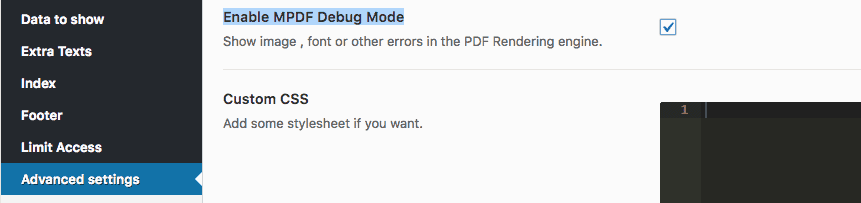
To debug image loading go to plugin settings > advanced settings. There enable the MPDF Debug mode:
 https://www.welaunch.io/en/wp-content/uploads/sites/8/2017/09/MPDF-Debug-Mode-247x58.png 247w,https://www.welaunch.io/en/wp-content/uploads/sites/8/2017/09/MPDF-Debug-Mode-510x120.png 510w,https://www.welaunch.io/en/wp-content/uploads/sites/8/2017/09/MPDF-Debug-Mode-300x71.webp 300w,https://www.welaunch.io/en/wp-content/uploads/sites/8/2017/09/MPDF-Debug-Mode-768x181.webp 768w" alt="MPDF debug mode" width="861" height="203" class="size-full wp-image-5507 lazy-load-active" style="box-sizing: border-box; border-style: none; display: inline-block; height: auto; max-width: 100%; vertical-align: middle; opacity: 1; transition: opacity 1s ease 0s;" decoding="async" data-src="https://www.welaunch.io/en/wp-content/uploads/sites/8/2017/09/MPDF-Debug-Mode.webp" data-srcset="https://www.welaunch.io/en/wp-content/uploads/sites/8/2017/09/MPDF-Debug-Mode.webp 861w,https://www.welaunch.io/en/wp-content/uploads/sites/8/2017/09/MPDF-Debug-Mode-247x58.png 247w,https://www.welaunch.io/en/wp-content/uploads/sites/8/2017/09/MPDF-Debug-Mode-510x120.png 510w,https://www.welaunch.io/en/wp-content/uploads/sites/8/2017/09/MPDF-Debug-Mode-300x71.webp 300w,https://www.welaunch.io/en/wp-content/uploads/sites/8/2017/09/MPDF-Debug-Mode-768x181.webp 768w" />
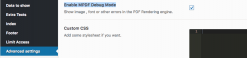
Look what the image errors show. Maybe you find the issue yourself.
If images still do not display you can solve the issue by the following ways:
Quick and Dirty:
Add the following to the mpdf.php file on line 12954 -> function: file_get_contents_by_curl()
curl_setopt($ch, CURLOPT_SSL_VERIFYPEER, false);
Source: https://stackoverflow.com/questions/5657382/curl-php-restful-service-always-returning-false
Better:
The better solution is to manually add only the certificate(s) or CA(s) you want to accept
;;;;;;;;;;;;;;;;;;;;
; php.ini Options  ;
;;;;;;;;;;;;;;;;;;;;

curl.cainfo = "C:\xampp\php\extras\ssl\cacert.pem"
On Nginx?
Some nginx server disallow some agents in the CURL header. Therefore you will need to change the header. Go to plugin-folder/includes/mpdf/mpdf.php > Line: 12965.
Then change the CURLOPT_USERAGENT value to ‘User-Agent: curl/7.39.0’
Example:
curl_setopt($ch, CURLOPT_USERAGENT, 'User-Agent: curl/7.39.0');
We resolved it. Your help article would be greatly improved if you suggest the following:
$this->mpdf->showImageErrors = true;
$this->mpdf->debug = true;
Add that to link 279 build_pdf() in class-woocommerce-pdf-catalog-public.php
once that was added the PHP debug log showed:
Jan 03 08:33:26 ip-10-0-36-166 debug: [03-Jan-2018 16:33:22 UTC] PHP Fatal error: Uncaught MpdfException: IMAGE Error (https://XXX/file.png): Could not find image file in /var/www/wordpress/htdocs/wp-content/woocommerce-pdf-catalog/includes/mpdf/mpdf.php:11752
this showed us the error was related to a DNS issue locally:
curl https://XXX/file.png
curl: (6) Could not resolve host: example.com
Once we saw that error, the problem was obvious
Thanks for the assistance –
Rod
Thank you for the valid feedback. We updated our FAQ ?